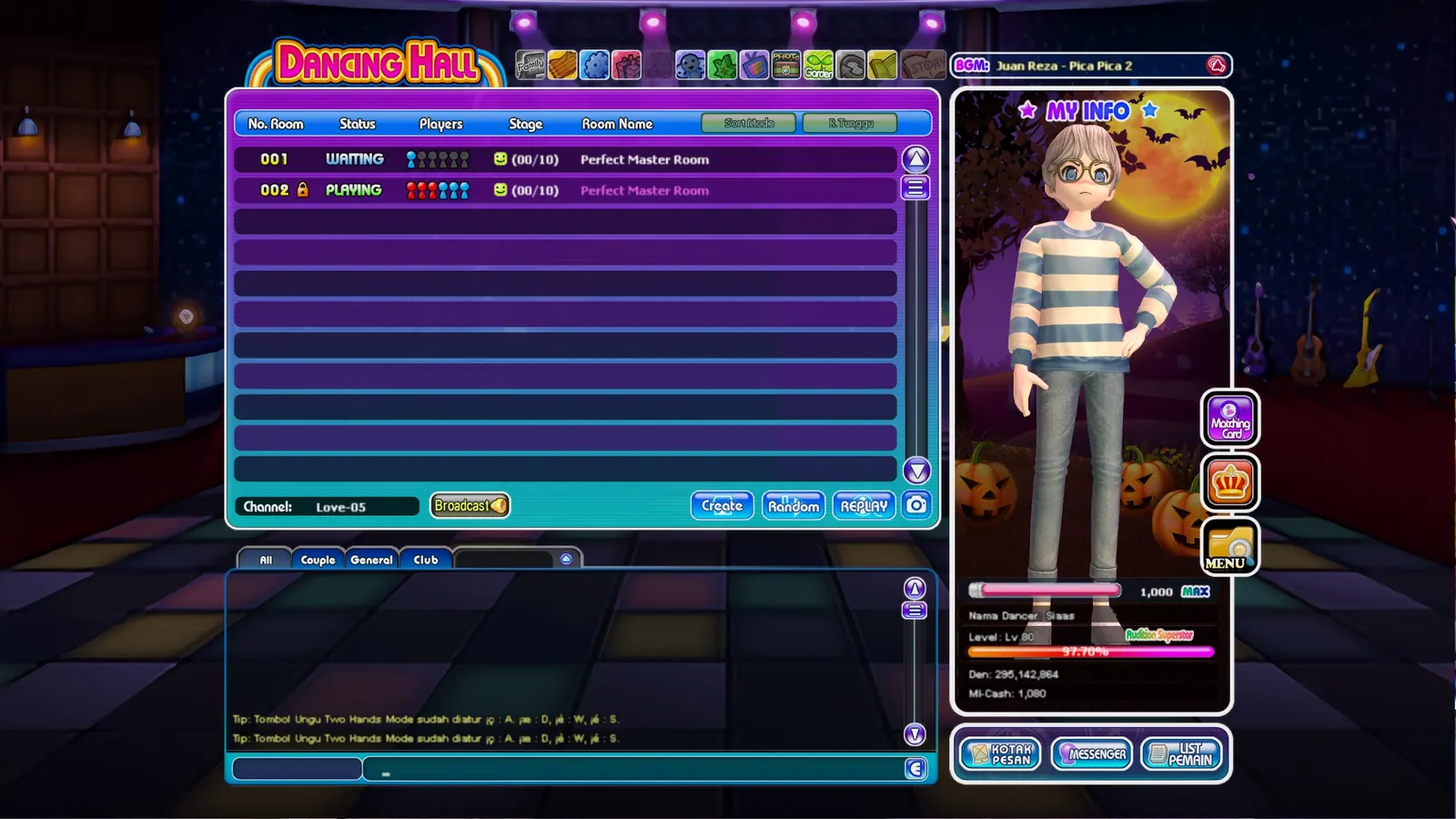
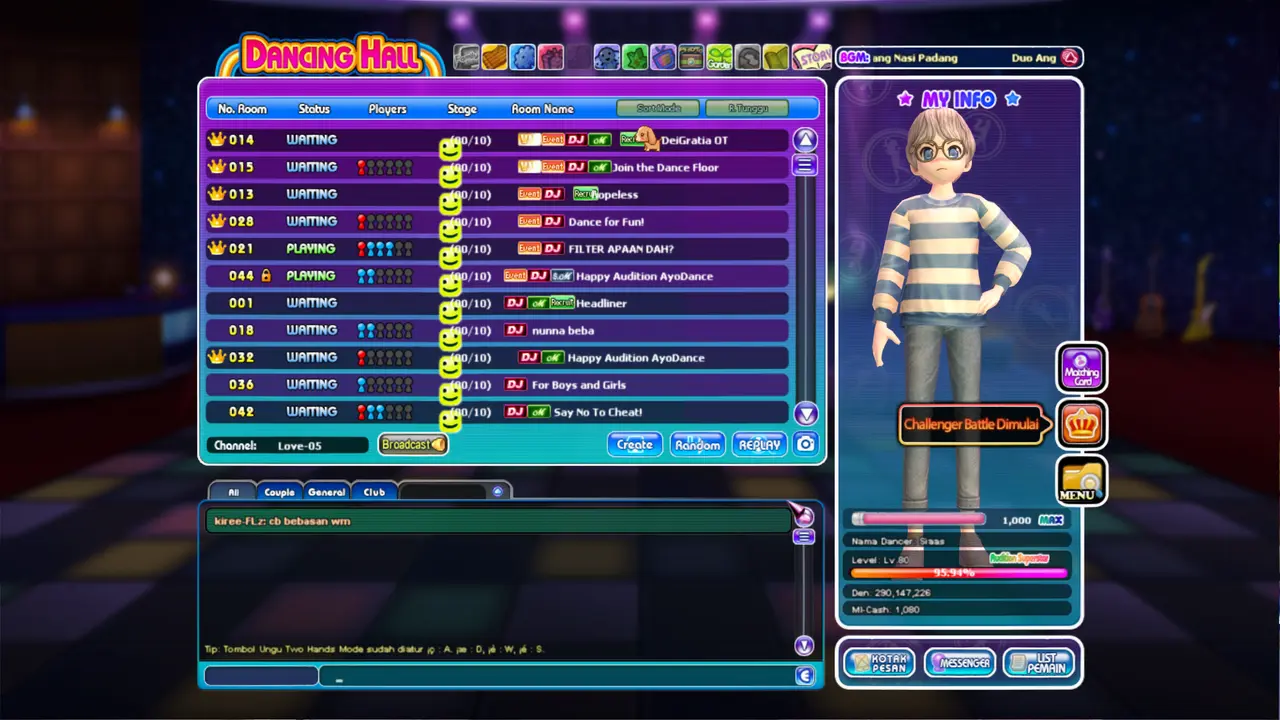
October was a financially brutal month, and November was not looking particularly forgiving either. Between real-life obligations and tech purchases, my discretionary budget was completely tapped out. If I spent even $70 on a newly released game on Steam, my personal cash flow for the month would have plunged straight into negative territory.
As a developer, when your budget is zero, you start looking for alternatives: what free, casual game can I play to unwind after work without spending a single dime?
1. The Desperate Search for a Free Casual Game
My initial instinct was to try something modern. I downloaded the latest MMORPG on everyone's radar, AION 2. The graphics were flashy and modern, but within the first few hours, I hit the inevitable wall: aggressive time-gating, convoluted progression systems, and blatant pay-to-win mechanics designed specifically to pry open your wallet. That completely defeated the purpose. I wanted casual relaxation, not a second unpaid job designed around microtransactions.
Then, out of nowhere, a wave of nostalgia hit me: AyoDance (Audition Online).
For anyone who grew up in Indonesia during the mid-2000s and 2010s, AyoDance was not just a game — it was an entire subculture. Back in my junior and senior high school days (SMP and SMA), afternoons were spent at internet cafes (warnet) aggressively mashing the arrow keys and slapping the spacebar to the beat of 140+ BPM tracks. It was the game that introduced me — and thousands of others — to Korean songs long before K-Pop became a global streaming phenomenon. Track titles like Aloha, Fly by Epik High, and Y (Please Tell Me Why) by Freestyle were burned permanently into my auditory memory.
Could I even log into my account from more than a decade ago?
I opened my cloud storage and began excavating the digital ruins of my old OneDrive folders. And miraculously, tucked deep inside a text file from years ago, my old Megaxus login credentials were still sitting right there intact (wkwk).
I immediately downloaded the client, patched the game, and fired it up.
2. The 2K Reality Check: Blurry Nostalgia
In my memories, AyoDance was vibrant, charming, and sharp. But nostalgia has a habit of playing tricks on your eyes.
When the game booted on my 27-inch 2560x1440 (2K) monitor, the visual shock was instant. The game was designed in an era when CRT monitors running 800x600 or 1024x768 were the gold standard. Stretched across a 1440p panel, the entire interface was a blurry, pixelated smear (wtf wkwk). The character face textures looked smeared with Vaseline, UI icons were fuzzy blobs, and reading song titles in the lobby gave me an immediate headache.
I could technically still play and hit the notes, but looking at it was genuinely painful.
We live in the era of generative AI, open-source computer vision models, and local GPU acceleration. As a software and data engineer, I refused to accept that I had to squint at 256x256 textures from 2006.
The thought occurred to me: Why not mod the game and upscale its outdated textures using modern AI?
How hard could it possibly be? Extract the game archive, run the DDS textures through an AI upscaler, repack them, and enjoy crisp visuals.
Famous last words. What I thought would be a quick weekend project turned into a multi-week deep dive through proprietary encrypted archives, ancient Photoshop bugs, broken hit-test mathematics, DirectML GPU pipelines, and writing a custom Direct3D 9 proxy DLL in C++.
graph LR
    A["AyoDance ACV Archives (DATA/*.acv)"] --> B["acv_unpack (Blowfish/Rijndael-256)"]
    B --> C["Raw DDS / Mislabeled Payloads"]
    C --> D["UltraSharpV2 (ONNX + DirectML GPU)"]
    D --> E["v64 Tagged 2x DDS Textures"]
    E --> F["acv_pack (Byte-Preserved Repack)"]
    F --> G["Game Client + Scoped D3D9 Proxy Shim"]
3. Hardship #1: Cracking the Proprietary ACV Archive Format
Modern games often keep their assets as loose files or use standardized container formats. AyoDance packs its entire universe into .acv archives inside the DATA/ directory — numbering from 001.acv up to 330.acv.
I started by looking at ancient reverse-engineering forum threads from 2008 on Zenhax and RageZone. The historical scripts people shared only supported what I call the "Plain" ACV format: a simple little-endian entry count, fixed 176-byte records, CP949 Korean filenames, and zlib-compressed streams.
When I ran those old tools against modern AyoDance archives, almost every single archive failed to extract.
The game's developers had not left the archive format untouched over the past twenty years. AyoDance had silently introduced six different format variants:
- Plain format: unencrypted header and plain zlib streams.
- Tagged formats 1, 2, and 3: encrypted index envelopes with custom 8-byte block transformations and Blowfish substitution tables.
- Tagged formats 5 and 6: masked entry counts, embedded index length masking, and Rijndael-256 block ciphers with customized key initialization.
Even worse, the game developers had planted deliberate traps. Archives like 242.acv, 243.acv, and 244.acv contained intentionally malformed non-texture decoy records with impossible cipher alignments. Any extractor attempting a naive, sequential decryption would choke and crash.
To solve this, I opened Audition.exe in Ghidra and traced the client's native archive loading routines. Once I recovered the native cryptographic routines and cipher tables, I built a standalone Python tool suite: acv_tools.
The unpacker parses all 330 archives, indexing 233,158 individual entries, including 159,003 DDS textures, with strict validation:
- Safe decoding with
--textures-onlyto bypass decoy records. - CP949 filename sanitization with surrogate escaping.
- Strict byte-for-byte non-replacement preservation: when repacking with
acv_pack.py, untouched payloads, original entry tags, IVs, and metadata remain bit-identical to the publisher's originals.
| Metric | Raw Installation Count |
|---|---|
| Total ACV Archives | 330 |
| Total Indexed Records | 233,158 |
| Total DDS Texture Entries | 159,003 |
| Sampling Validation Passed | 984/984 payloads across all 6 formats |
4. Hardship #2: The Cursed Texture Zoo (PSD, P8, Volumes, and BC7)
Once extraction worked, I expected a clean folder of standard DirectX DXT1 and DXT5 textures. Instead, I opened Pandora's box of twenty years of accumulated game development quirks:
The Mislabeled Photoshop Files
Dozens of files named something.dds failed every DDS parser in existence. When I inspected their hex headers, they did not start with DDS |. They started with 8BPS — the magic bytes of an Adobe Photoshop .psd file! Developers back in 2005 had literally saved raw PSD files directly into the asset tree and renamed them to .dds, relying on the client's internal fallback decoder to read the saved composite image. To upscale these, my pipeline had to identify PSD magic bytes, parse the composite layer, and flatten it into standard BGRA8 DDS.
The P8 Palette-Indexed Textures
Some UI elements and fonts were encoded as 8-bit palette-indexed DDS (D3DFMT_P8). Passing an 8-bit palette texture through a standard RGB neural upscaler outputs complete garbage. The pipeline had to decode the 256-color palette, upscale the RGB data, and then requantize the enhanced result back into a shared 256-color RGBA palette across all generated mipmaps while retaining transparency.
Depth-One Volume Textures and BC7
I encountered DXT volume textures where the depth dimension was set to 1, causing modern tools to reject them as invalid 3D containers. Furthermore, a handful of newer files were single 2D BC7_UNORM (DirectX 10) textures with straight alpha — which Direct3D 9 cannot upload natively. The pipeline had to decode these down to uncompressed BGRA8 with matching mip policies.
5. Hardship #3: Scaling 159,000 Textures Without Melting the GPU
Upscaling a few dozen textures is trivial. Upscaling 159,003 textures across 330 archives is a massive distributed computing problem.
I evaluated several AI upscaling architectures:
- ESRGAN: Great sharpness on natural photos, but introduced ugly ringing artifacts around pixel-art fonts and stylized game UI.
- CPU DAT: Accurate, but agonizingly slow. Upscaling the full asset catalog on CPU would have taken weeks of 100% continuous processor load.
- PyTorch DirectML: High inference speed on AMD/Intel/NVIDIA GPUs on Windows, but the PyTorch DirectML backend produced subtle horizontal seam artifacts across tiled inference boundaries.
The winning solution was UltraSharpV2 (4x-UltraSharpV2_fp32_op17.onnx) running via ONNX Runtime with the DirectML execution provider (onnxruntime-directml).
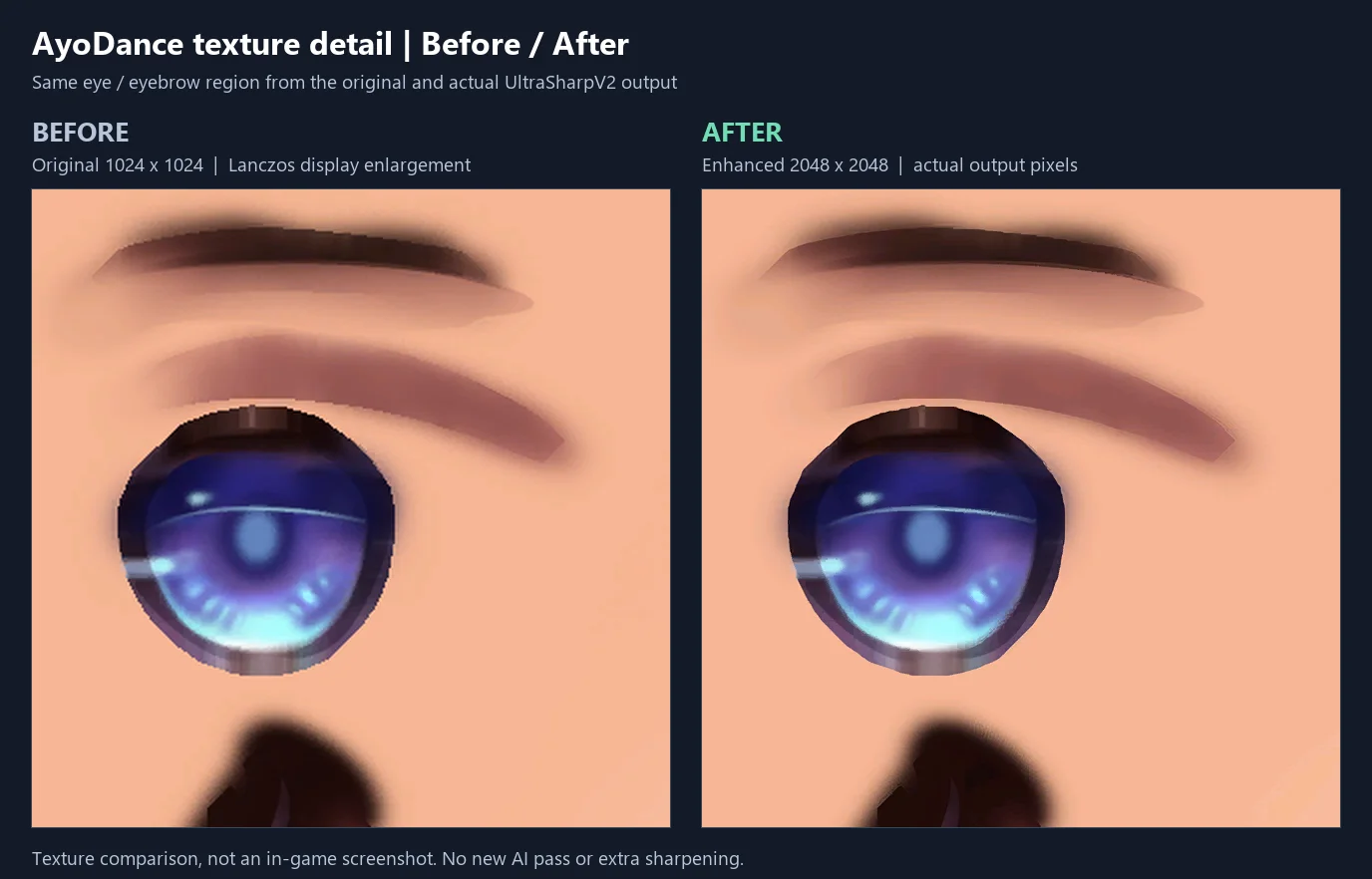
The pipeline works as follows:
- Microsoft DirectXTex
texconv.exedecodes DDS payloads to lossless RGBA. - The RGB channels are passed through UltraSharpV2 on GPU Adapter 0, producing a clean 2x upscale (capped at 2048px on the longest dimension).
- The alpha channel is extracted and scaled independently with Lanczos interpolation, preventing color halos and edge bleed.
- The RGB and alpha streams are recombined and encoded back to DDS matching the exact original compression format (DXT1, DXT3, DXT5, or BGRA8) and mipmap count.
- An SHA-256 image cache and receipt system (
.metadata/NNN.acv.json) tracks every processed file. If the process is interrupted, it resumes instantly without re-processing previously upscaled textures.
6. Hardship #4: The Game Engine Rendering Problem (Why Upscaling Broke the Game)
With all textures upscaled and repacked into fresh ACV archives, I excitedly booted the game.
The moment the main menu loaded, everything broke completely.
Buttons were gigantic and overflowing off the screen. Character clothes were floating five inches away from their bodies. Most frustrating of all: clicking on menu buttons did absolutely nothing. You had to hover your mouse three inches to the bottom-right of a button in empty space to trigger a click!
Why did this happen?
AyoDance's Direct3D 9 engine from 2004 was built on a shortcut common in older games: it tightly coupled GPU texture pixel dimensions to UI logical layout and mouse hit-testing. The UI system assumed that if a texture was 128x64 pixels on disk, the UI element was exactly 128x64 pixels on screen.
When I doubled the texture to 256x128 pixels to make it sharp in 2K, the game engine doubled the size of the quad, stretched the UI atlas, and scaled the mouse hit-test bounding box!
graph TD
    subgraph Naive Upscaling Failure
        N1["Double DDS Dimensions (128x64 -> 256x128)"] --> N2["Engine reads DDS Header: 256x128"]
        N2 --> N3["UI Quad doubles in physical size"]
        N2 --> N4["Mouse hit-box shifted & misaligned"]
    end
    subgraph D3D9 Proxy Shim Solution
        S1["Tag native dimensions in DDS reserved header (v64)"] --> S2["d3d9.dll intercepts CreateTexture"]
        S2 --> S3["Upload 256x128 high-res texture to GPU"]
        S2 --> S4["Lie to Game Engine: Report original 128x64 dimensions"]
        S4 --> S5["Downsample alpha hit-test cache to match original bounds"]
    end
7. Hardship #5: Building a Direct3D 9 Shim & The Two-DLL Cache Fix
Replacing files inside .acv was not enough. To make high-resolution textures work without breaking the UI, I had to build an experimental C++ Direct3D 9 proxy shim (renderer_patch).
The architecture consists of three key components:
1. Dimension Tagging (v64 Header Marker)
When acv_upscale.py generates an enhanced texture, it embeds the texture's original, native pixel dimensions into the unused reserved fields of the DDS header.
2. D3D9 Proxy Interception (d3d9.dll)
I wrote a custom d3d9.dll proxy placed directly in the game folder beside Audition.exe. When the game calls CreateTexture:
- The shim inspects the DDS header.
- If the
v64marker is present, it allocates the full high-resolution texture on the GPU. - When the game queries the texture's dimensions for UI placement, the shim intercepts the call and lies to the engine, returning the original native dimensions.
- The shim maintains a downscaled alpha hit-test cache, calculating the maximum alpha value in each 2x2 or 4x4 pixel block so mouse clicks land on the exact pixel boundaries the original designers intended.
3. The Two-DLL Cache Fix (acv_patch_boundary.dll)
During early playtests, the client would intermittently crash to desktop (CTD) during startup. By tracing the client's disassembly and memory allocation in Ghidra, I discovered that the game's internal archive cache had a subtle race condition: multiple threads initialized archives simultaneously before the D3D device was even created, causing archive-ID cache collisions.
To fix this safely without patching the executable binary, I split the patch into a scoped two-DLL architecture:
d3d9.dll: Handles GPU texture upload, dimension virtualization, and UI hit-test scaling.acv_patch_boundary.dll: Provides a thread-safe publication boundary using loader locks and Structured Exception Handling (SEH) unwinds to serialize archive-phase initialization safely.
On November 4, 2026, I completed local validation across a full set of 330 ACVs, 48 loose DDS files, and 43 JPGs.
The result? Crisp, modern 2K graphics, zero UI distortion, responsive mouse hitboxes, and rock-solid 60 FPS gameplay.
8. Downloads & Texture Pack Access
For players who want to experience AyoDance with sharp, modernized textures and the companion Direct3D 9 renderer patch, I have made the complete upscaled texture set and renderer bundle available on Google Drive:
- AyoDance Upscaled Textures & Patch Renderer (Google Drive)
- Source Code & Tooling (GitHub: ayodance-texture-tools)
Maintenance & Contributing
Note
This post and the texture packs are bound to be updated whenever new game patches drop—provided I am still actively playing the game! If you would like to help maintain the textures, test compatibility with future patches, or contribute improvements to the pipeline, feel free to contact me or contribute directly on the GitHub repository.
Warning
Modding Policy & Fair Play Notice: AyoDance Game Rule 6 explicitly prohibits unauthorized client modifications on live service servers, with violations subject to permanent account suspension. These tools, research findings, and texture patches were developed strictly as an offline reverse-engineering case study and educational technical demonstration. Use them at your own risk, and never deploy modifications to competitive or live production environments.
9. Conclusion: Nostalgia, Preserved
What started in October as a desperate attempt to avoid spending money on games turned into one of the most rewarding reverse-engineering adventures I have tackled in a long time.
It taught me that solving problems in legacy games is rarely just about running an AI model. It is about understanding the constraints of the engineers who built the system twenty years ago: how they optimized texture memory, how they structured container formats, and how they coupled rendering directly to game logic.
Sitting back and playing 8-key mode to Epik High and Freestyle on a modern 2K monitor — without squinting at blurry pixels or dealing with pay-to-win microtransactions — was worth every line of C++ and Python. Sometimes the best gaming experiences do not cost $70. Sometimes, they just cost a few git commits and a trip down memory lane.