When CapCut decided to lock its automatic caption generation behind a paid subscription, it was the final push I needed to rethink my entire video editing pipeline. I packed up my projects and migrated permanently to DaVinci Resolve for all my video editing work.
DaVinci Resolve is an incredible, professional-grade NLE, but as a freelance content creator, I immediately ran into a crucial workflow bottleneck: captions.
1. Why Captions Are Non-Negotiable
For independent content creators, subtitles aren't just aesthetic flair or an optional enhancement. They are fundamental for two massive reasons:
- Accessibility: Subtitles ensure Deaf and hard-of-hearing viewers can fully engage with and follow your content. Furthermore, a huge percentage of viewers on social platforms watch videos in public environments with sound muted.
- International Reach: Clean, accurately timed captions make content digestible for non-native speakers and provide a clean foundation for multi-language subtitle translations.
Faced with third-party web apps demanding recurring monthly subscriptions or uploading my unreleased audio to cloud servers, I looked at my workstation. My PC has plenty of compute power, and we live in the golden era of open-weights local AI.
I asked myself: Why pay a subscription or upload gigabytes of data when my own machine can transcribe audio in seconds?
So I decided to build SubForge—a fast, local-first subtitle generation and editing studio tailored for creator workflows.
2. Why a TUI / REPL Interface?
Most creator tools try to wrap everything into bloated Electron apps or heavy GUI windows. But in my daily engineering workflow, I live inside terminal-driven interfaces and REPLs alongside coding agents.
Terminal interfaces provide:
- Zero Input Latency: Instant keyboard responsiveness without UI lag or DOM overhead.
- Keyboard-Centric Flow: Every action can be triggered in a fraction of a second without reaching for the mouse.
- Minimalist Aesthetic: High information density with clean, distraction-free typography and transparent terminal background support.
       ┌────────────────────────────────────────────────────────┐
       │                       SUBFORGE                         │
       │         Local AI Subtitle Studio (v0.2.0)              │
       └────────────────────────────────────────────────────────┘
                                   │
      ┌────────────────────────────┼────────────────────────────┐
      ▼                            ▼                            ▼
   /new <audio>               /transcribe                  /review
Import exported            Local whisper.cpp             Edit caption text,
timeline audio             GGML model inference          speaker tags, & preview
                                   │
                                   ▼
                             /export
                     Direct .srt & .ass export
                     Ready for DaVinci Resolve
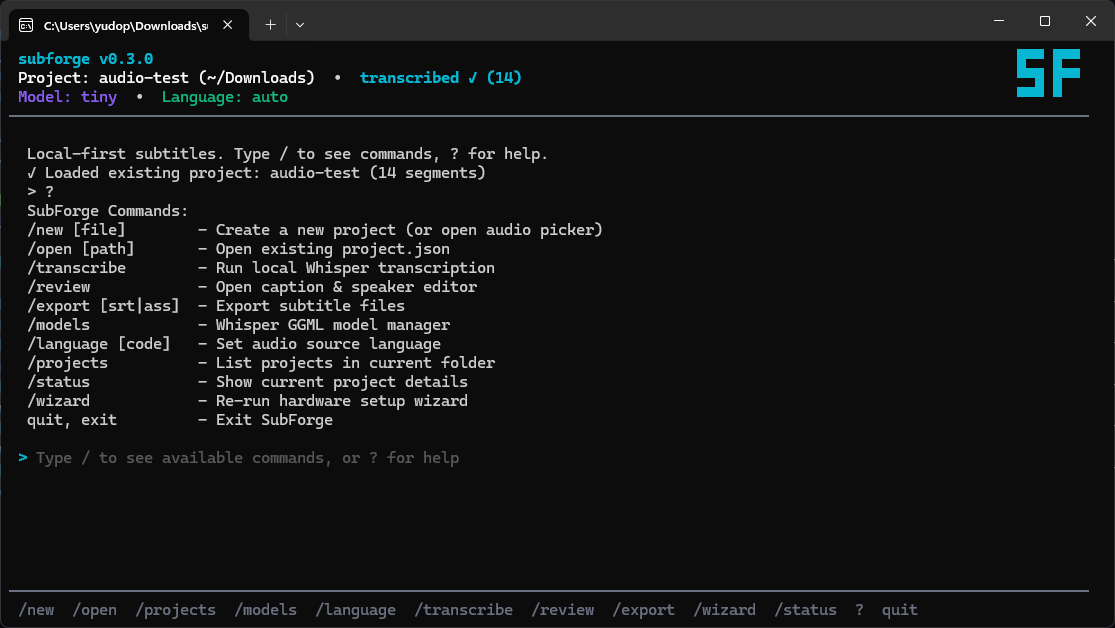
Built in pure Go with Bubble Tea, SubForge gives creators full control through an interactive REPL featuring bash-like ↑/↓ command history recall and real-time / slash command autocompletion with interactive Tab suggestion navigation:
/new <audio>: Create a project and ingest the exported audio track from DaVinci Resolve./transcribe: Run speech-to-text locally with real-time progress tracking./review: Open the interactive review screen. Edit caption text (Enter), edit speaker tags (s), preview segment audio (Space), and undo mistakes (u)./export: Export production-ready.srtand styled.asssubtitle files directly into your./subforge/project directory./models: Download and manage GGML Whisper models on demand with in-app progress bars.
3. Zero Bloat Architecture: Go, whisper.cpp & GGML
A major frustration with modern Python AI tools is dependency bloat. Installing PyTorch, TorchAudio, and complete CUDA runtimes routinely consumes 5GB to 10GB of disk space and creates brittle environment dependencies.
SubForge was architected with a strict rule: Zero Bloat. It compiles to a single static binary (~7.8 MB uncompressed, or ~2.6 MB with UPX), ensuring instant startup (<10ms) and a tiny memory footprint (~15MB RAM).
graph TD
    Audio[timeline_audio.wav] --> Pipeline[SubForge Pipeline Engine]
    Pipeline --> WhisperCLI[Standalone whisper.cpp Executable]
    ModelStore[(GGML Model Cache: tiny ... large-v3)] --> WhisperCLI
    WhisperCLI --> Parser[Stream & Timestamp Parser]
    Parser --> Canonical[Canonical Project State in ./subforge/]
    Canonical --> TUI[Bubble Tea Interactive Reviewer & Audio Scrub]
    TUI --> Exporter[SRT & ASS Exporter]
    Exporter --> Resolve[DaVinci Resolve Subtitle Track]
Standalone whisper.cpp Integration
Instead of bundling heavy deep-learning frameworks, SubForge utilizes standalone, pre-compiled whisper.cpp binaries paired with quantized GGML models (tiny, base, small, medium, large-v3-turbo, large-v3).
- Hardware-Aware Model Selection: Built-in hardware detection checks available CPU cores and system RAM, recommending the optimal model size for real-time speed versus accuracy.
- On-Demand Model Fetching: Models are pulled on demand with terminal progress indicators directly into local application data storage.
- Rock-Solid Reliability: The single static binary prevents memory leaks, avoids environment dependency hell, and keeps the application incredibly lightweight.
4. The Canonical Data Model & Resilient Pipeline
Subtitle generation pipelines should never be opaque or fragile. SubForge uses an explicit, resumable pipeline architecture:
stateDiagram-v2
    [*] --> Ingest: /new audio
    Ingest --> Transcribe: /transcribe
    Transcribe --> Review: /review (Editable & Audio Sync)
    Review --> Export: /export
    Export --> [*]: .srt / .ass created in ./subforge/
    note right of Transcribe
      Stages persist state locally:
      PENDING -> RUNNING -> COMPLETED
    end note
Key Architectural Principles:
- AI Does Not Own Metadata: Whisper generates text and rough segment bounds, but segment IDs, timestamps, audio references, and project states are strictly owned and validated by the application core.
- Resumable Stages: Each pipeline stage writes state (
PENDING,RUNNING,COMPLETED,FAILED) locally. Retrying an operation or reopening a project picks up right where you left off. - Format Independence:
.srtand.assare purely export artifacts. Internally, captions are represented as a normalizedSegmentdata structure with sub-second floating-point timestamps, ensuring clean round-trips and effortless formatting.
5. From DaVinci Resolve to Final Captions in 60 Seconds
The day-to-day workflow is seamless:
- Export Audio: In DaVinci Resolve, export your final dialogue/audio track as a
.wavor.mp3. - Launch & Transcribe:
subforge # In SubForge: type /new <audio> to load, then /transcribe - Quick Review: Type
/reviewto scrub through any ambiguous words. UseSpaceto preview audio,Enterto edit text,sto edit speaker tags, anduto undo. - Export & Drop: Type
/exportto output{project_name}.srtand.assdirectly to your./subforge/directory. Drag and drop the.srtdirectly into your DaVinci Resolve timeline subtitle track.
No cloud uploads, no monthly paywalls, and no audio leaving your computer.
6. One-Line Install & Open Source
SubForge is completely open-source under the MIT license and installs with a single command—no manual Python, Go, or PyTorch setup required. It downloads a standalone static binary.
Windows (PowerShell)
irm https://raw.githubusercontent.com/yudopr11/subforge/master/subforge.ps1 | iex
Linux & macOS (Terminal)
curl -fsSL https://raw.githubusercontent.com/yudopr11/subforge/master/subforge.sh | sh
(Note: Recent updates include improved POSIX shell compatibility and Rosetta detection for seamless macOS installs.)
After installation, simply open a new terminal window and type subforge.
Developer Setup
For developers contributing or building from source:
git clone https://github.com/yudopr11/subforge.git
cd subforge
make test    # Run tests
make build   # Build single static binary
./bin/subforge
You can check out the source code, contribute, or report issues on GitHub:
👉 github.com/yudopr11/subforge
Building SubForge solved an immediate daily friction in my creative workflow—turning a frustrating paywall into a local, open-source tool that respects user privacy, performance, and accessibility.