I play a lot of JRPGs, and I play them the way I work: I do not want to leave the game to read a guide.
When I hit a dialogue choice I am unsure about, when a boss is not going down, when I want to know whether a stat screen means what I think it means, what I actually want is simple: something that looks at the same screen I am looking at and tells me what it means. Not a wiki article written for patch 1.2, not a forum thread from 2019 — this screen, right now.
1. The Tedious Part Was Never the Answer
My old loop went like this. Pick up my phone. Aim the camera. Take the photo. Open an AI chat app or Google Lens, upload it, and ask "who is this character". Then open a browser, search for the walkthrough, scroll through a forum, find the section, and finally map what the text describes onto what I remember seeing on my TV.
The answer is fast. Everything around the answer is slow, and the slow part is not "searching" — it is the round trip. Unlock, aim, upload, wait, scroll, remember. Do it twenty times in a session and you stop doing it, and then you are stuck guessing on the one choice you cannot take back.
There is a second problem, and it is the one that actually annoyed me as a developer. A guide is written for a version of the game that is not necessarily mine. So even after the round trip, I still had to reconcile: is this the dialogue before or after the cutscene I already triggered? Is my build the chapter-three build the guide assumes? I was doing version-control archaeology on my own save file, with a search engine as the tool.
2. The Realization: I Already Live in a Terminal
I am a data engineer. My working day is a terminal with a coding agent in it. I do not open a different tool to think.
So the question stopped being "how do I build a game companion app" and became "why would I build a different app at all?" A standalone companion means a tray icon, a window, an overlay, an installer, autostart, its own settings screen, its own conversation storage, its own model picker, and a UI/UX pass on all of it. That is weeks of work on the shell around a problem that is really three lines long: which window is the game, how do I get its pixels, and when should I look at them.
Everything else already exists, and I already know how to use it. pi already streams tokens, already persists sessions and resumes them, already compacts context when a conversation gets long, already tracks token cost, already has slash commands, already picks models. Rebuilding those is the exact cost I was trying to avoid.
So I threw the standalone design away and shipped it as a pi package instead. One install command. No UI, no UI/UX, no installer — the terminal I already live in is the app. I got the companion I wanted for the cost of the part that was actually hard.
3. The Three Things pi Cannot Do
The pivot only makes sense because the gap was small. Here is the whole honest accounting:
| Concern | Owner |
|---|---|
| Attaching an image to a prompt | pi |
| Streaming the answer | pi |
| Sessions, resume, branching | pi |
| Context compaction | pi |
| Model list and switching | pi |
| Token counts and cost | pi |
| Slash commands | pi |
| Knowing which window is the game | me |
| Capturing its pixels | me |
| Firing without pi having focus | impossible from inside pi |
That last row is why there is no overlay and no global hotkey in v0.1.0. A pi shortcut is a TUI keybinding: it only fires when the pi terminal has keyboard focus. A hotkey that fires while a game has focus cannot be registered from inside a pi process. I did not treat that as a problem to route around — I treated it as the boundary of what a package can be.
4. The Design That Cannot Work: Foreground Capture
The obvious implementation is to screenshot the foreground window when I press Enter. It is wrong, and it is wrong in a way that would have shipped a broken product.
To type a question, I alt-tab to the terminal. So at the moment of capture, the foreground window is Windows Terminal. Foreground capture sends a photograph of a text editor to a vision model, every single time, and looks like it works because an image did arrive.
So /gs play binds one specific window handle (an HWND) instead. Before every capture the handle is re-validated against the live window list, because Windows recycles handles — a persisted binding can quietly point at an unrelated window after a restart. Bindings are session-scoped and never trusted blindly. If I switch games, I run /gs play again.
graph LR
    A["/gs play — bind a window handle"] --> B["I ask a question"]
    B --> C{"Does the answer need the screen?"}
    C -->|"lore, builds, strategy"| D["Answer from the web or from knowledge"]
    C -->|"what just happened, what does this menu say"| E["game_frame: re-validate the handle"]
    E --> F["PrintWindow, scale to 1280px, JPEG q80"]
    F --> G["Tool result: caption plus image"]
    G --> H["Vision answer"]
    D --> H
5. The Frame Is Taken When the Model Asks, Not When I Do
I designed this part three times and shipped the third version. The first two are the interesting part.
Version one — capture on submit. Always attach a frame to every message. Predictable, simple, and wrong for my actual questions. "Who is the antagonist in chapter three" needs no screen at all, yet I paid for a capture, the image tokens, and permanent session-file growth on every turn.
Version two — inject at pi's request-local context hook, so image bytes never touch disk. Technically the elegant answer: the frame reaches the model without bloating session files, and the transcript keeps reading [FRAME #014 · eldenring.exe] forever. But I had traded away something I wanted more: the frames in my own scrollback. I was re-injecting images into every request to get back the history the design had thrown away.
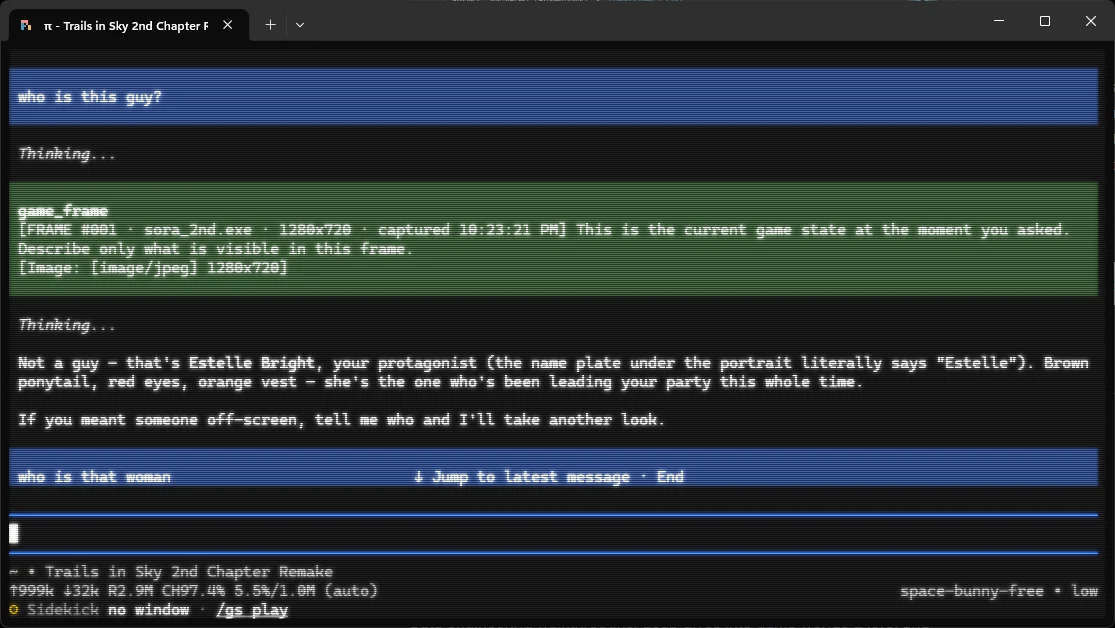
Version three — ship it as a tool. The model calls game_frame when the answer depends on what is on screen, and answers without it when the question is about the game rather than the screen. A lore question costs nothing. A screen question costs one frame.
The honest caveat is that this moves the decision from deterministic code to model behaviour, and the tool description is load-bearing — it carries the explicit trigger list (what just happened, where am I, what does this menu or stat screen say, what changed since the last frame) and the non-trigger list (lore, builds, recipes, boss strategy, who a character is, or an earlier frame already answers it). A tool the model cannot date is a coin flip, and both outcomes are worse than the per-message capture it replaced. When I am genuinely unsure whether the screen matters, the guidance is to look: a second of delay is cheaper than a confidently wrong answer.
The numbers underneath are deliberately boring: 1280 px long edge, never upscaled (a 720p game stays 720p), JPEG quality 80, roughly 150 KB and ~595 image tokens per frame — about $0.00006. Capture is also optional in the other direction: /gs auto off puts a frame on every message again, for the days I want the old behaviour.
6. The 19 MB Dependency I Deleted
The first version scaled and encoded with sharp. sharp ships libvips, and libvips-42.dll alone was 19 MB — 86% of the whole package. That was already bad. The worse part was where the work happened: scaling in JavaScript meant a 2560x1440 window crossed the PowerShell boundary as 5.9 MB of base64 PNG, so I shipped 40x the bytes to produce the ~150 KB frame that was the point.
The fix was to move scaling, encoding, and the black-frame statistics read into the C# P/Invoke shim the package already compiles on first use. One PowerShell invocation in, one finished JPEG out. dependencies: {}. The install is a ~780 KB clone, of which roughly 190 KB is what pi actually loads, and there is no node_modules at all.
What I gave up: libvips is a better JPEG encoder than GDI+, so file sizes shift a little at the same quality number. Nothing the package used was lost — it only ever went PNG in, JPEG out, plus one statistics read.
7. Screenshots Are Not the Same as Answers
The companion ships with a gaming-companion skill, and it is the part I am happiest with — because it draws a line I have seen AI answers blur constantly:
- A frame is authoritative for what is on my screen right now. Never search for it. Identifying a scene by looking it up is how you end up describing a different version of the game.
- The web is authoritative for everything a frame cannot show: item locations, quest names, map positions, boss strategy, party composition, lore, version-specific mechanics, what a specific error means.
And when a wiki written for another patch disagrees with the frame in front of me, the frame wins for this player — and it says so out loud: the guide says X, your screen shows Y, you are on a different version. That is exactly the version-archaeology problem from section 1, now handled by the tool instead of by me.
The skill also tells the model to say plainly when small UI text is illegible at 1280 px instead of inventing a stat number, to prefer one good search over five, and to never describe a screen it did not actually look at.
8. The Limits, Honestly
- Windows only. The window enumeration shim is a small P/Invoke library built on first use.
- No overlay. You alt-tab to the terminal to ask. This is the thing everybody will notice is missing, and I accepted it on purpose: I wanted to learn whether the conversation quality justifies an overlay before building one, not after.
- Borderless or windowed. Exclusive fullscreen usually yields a black frame through a desktop-grab path. The question still gets answered, the frame is dropped, and the reason is stated instead of guessed around.
- Text only. No
ReadProcessMemory, no DLL injection, no hooks, no input automation. It sees pixels and window titles, nothing else. - Single-player, offline, PvE. Real-time advice during competitive play crosses from "assistant" into "cheating" and puts my account at risk. That is a product policy, not a technical limit.
Every failure in that list degrades to a working text-only session. A companion that silently drops my question is worse than one that answers without a picture.
9. Try It Yourself
It is MIT-licensed, Windows-only, and at v0.1.0 it is thirteen small TypeScript files over one PowerShell shim.
pi install git:github.com/yudopr11/pi-gamer-sidekick
Then, in a session:
/gs setup     # confirm window enumeration and capture both work here
/gs play      # pick the game window to watch
After that, I just ask. Ask about the screen and it looks; ask about the game and it does not. /gs status tells me what is bound and what it has cost so far.
The screenshot at the top of this post is the whole product in one turn: a question about a character, one game_frame call against sora_2nd.exe, and an answer grounded in the exact frame I was looking at when I pressed Enter — instead of a photo taken with my phone.
👉 github.com/yudopr11/pi-gamer-sidekick
The lesson for me was not really about Win32 or JPEG quality. It was that I was about to spend weeks building a UI around a problem, when the tool I already used every day was missing three small capabilities. Sometimes the shortest path to a new tool is not writing the app — it is finding out what your existing one is three functions short of.